Fully Automatic
Lumino's Auto Mode monitors your MacBook's built-in light sensor twice a second. The moment ambient light shifts, your external displays follow. No interaction required.
Lumino reads your MacBook's built-in ambient light sensor and automatically adjusts your external monitor brightness to match — any DDC/CI-compatible display, completely hands-free. No clicks, no dragging, no thinking about it.
macOS 13 Ventura or later · Apple Silicon
Lumino automatically controls your external monitor brightness using your Mac's built-in ambient light sensor — quiet, precise, and completely hands-free every time your lighting changes.
Lumino's Auto Mode monitors your MacBook's built-in light sensor twice a second. The moment ambient light shifts, your external displays follow. No interaction required.
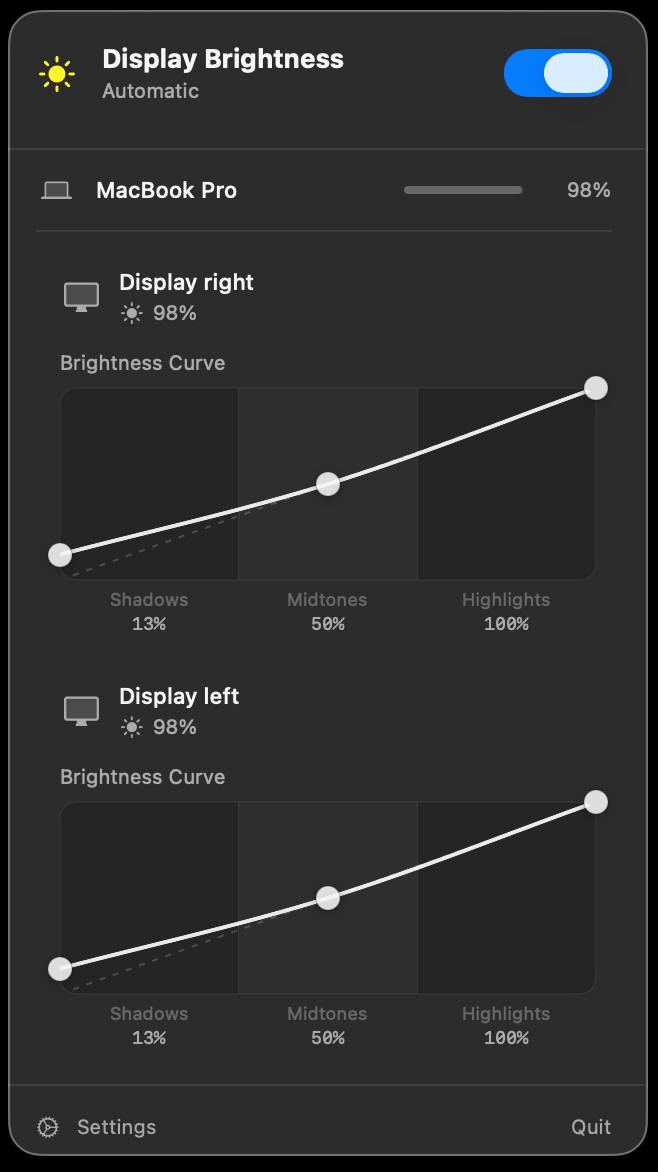
Shape how brightness scales with light using three intuitive control points: Shadows, Midtones, Highlights. A cubic spline gives you smooth, natural transitions tailored exactly to your setup.
Lives in your menu bar, built entirely with SwiftUI. Respects system themes, uses native animations, and never touches your Mac's internal brightness settings.
Under 5 MB installed. Uses negligible CPU and memory. Launches in milliseconds. It simply isn't there when you don't need it. No battery drain, no slowdowns.
Zero cloud connectivity. No account required. Anonymous analytics are strictly opt-in. Your display configuration never leaves your Mac. Ever.
Connect a new display mid-session and Lumino detects it instantly. Restores your saved curve and brightness preference automatically. No reconfiguration needed.
Open the DMG, drag Lumino to Applications. It appears in your menu bar immediately. No account, no setup wizard, no permissions dialogs beyond accessibility access.
Drag the three curve handles to match your preference. Want brighter shadows? Flatter highlights? The spline updates live. Watch your displays respond in real time.
Close the popup, go back to work. Lumino runs silently in the background, adjusting brightness as light changes. Perfectly, every time, without a thought.
I set it once two months ago and haven't thought about display brightness since. Exactly what I want from a menu bar app.
The curve editor is the feature I didn't know I needed. My studio display now dims differently than my MacBook, exactly how it should be.
Finally an app that does one thing perfectly. No subscription, no dock icon, no bloat. $12.99 well spent.
Pay once. Use forever. No subscriptions, no upsells, no dark patterns.
Lumino for Mac
One-time payment · All future updates included
Secure checkout via Paddle · macOS 13+ required
Most modern monitors support DDC/CI for hardware brightness control. Lumino automatically detects this capability. For monitors connected via USB hubs or docks that block DDC, Lumino falls back to a Gamma-curve method, shown with an orange badge. A small number of monitors are read-only and cannot be adjusted.
No. Lumino is designed to have zero perceptible impact on battery life. It reads a lightweight sensor value every 500ms, comparable to a background notification check. CPU usage is effectively 0% when displays are stable.
Lumino detects clamshell mode and pauses automatic adjustment. When you open the lid again, it resumes immediately and re-syncs all displays to the current ambient light level.
There's no traditional trial, but at $12.99 the risk is low. If Lumino doesn't solve your problem, reach out at support@lumino.tools within 14 days for a full refund. No questions asked.
Lumino requires an Apple Silicon Mac (M1 or later) running macOS 13 Ventura or newer. Intel Macs are not supported, as Lumino relies on the ambient light sensor built into Apple Silicon MacBooks.
Optional analytics (TelemetryDeck, GDPR-compliant) can be enabled during onboarding. It is off by default. Even when enabled, no personally identifiable information is collected: only anonymous usage events like app launches and feature toggles.
MonitorControl is a free, open-source tool great for manual brightness control via keyboard or menu bar — but it has no automatic adjustment based on ambient light. Lunar is a powerful alternative with many features, but charges a recurring subscription for its automatic brightness mode. Lumino is purpose-built for one thing: automatic ambient-light-driven external monitor brightness. One thing, done really well, for a one-time $12.99. No subscription, no feature bloat.
Lumino works with any external monitor that supports DDC/CI — the standard hardware protocol for digital brightness control. This includes most modern displays from Dell, LG, Samsung, BenQ, ASUS, and many others. For monitors where DDC/CI is blocked (often by USB-C hubs or docks that don't pass through the protocol), Lumino automatically falls back to a Gamma-curve adjustment, shown with an orange badge. A small number of monitors are entirely read-only and cannot be adjusted by any software.
Join thousands of Mac users who've stopped thinking about brightness forever.
Buy Lumino — $12.99